Data-Driven Documents(d3)是一个JavaScript类库,基于W3C标准,使用HTML、SVG和CSS把数据转换为各种绚丽的图形。
支持的数据格式有常见的:txt、html、json、html、xml、csv等
直接调用d3库制作的Bubble图(如下):
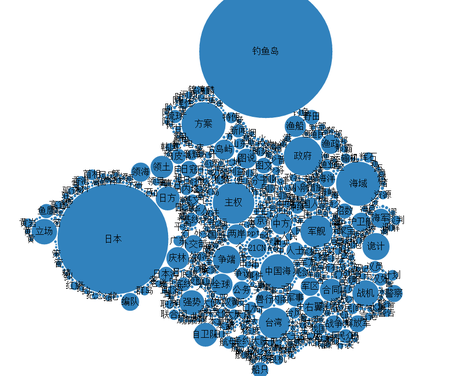
2万条数据耗时10秒左右(肉眼估测);
更多内容请见:
官方主页:http://d3js.org/
在线示例:https://github.com/mbostock/d3/wiki/Gallery
]]>技术实现:采用Java的LinkedHashMap与HashMap在内存中进行运算
由于开发机的内存不够大,需要将开发机器上的程序打包传到服务器上运行,但是在运行的过程中,每次运行至1.5亿后,程序运算时间明显变慢,成2的n次方级别递增。
这时候查看内存,Java程序进程占用内存为4G,很熟悉的数字。
经检查发现,程序开发机的JDK是32位的,而服务器端的JDK是64位的,换了台64位的机器,使用64位JDK打包上传,问题解决。
开发环境和运行环境的一致性一如既往的重要啊。
]]>由于每次迭代需要上百亿次的平方运算,原来的代码采用的Math.pow的方法进行平方运算,如果这一个步骤每次都可以节省一些时间,那么对于上百亿次的运算来讲,运算时间将大大缩减。
采用了三种运算方式,进行对比,结果如下(实验数据使用浮点数):
平方运算(耗时单位:ms):
| 运算次数/耗时 | 1亿次 | 2亿次 | 4亿次 | 8亿次 | 16亿次 |
| Math.pow | 1245 | 2499 | 5003 | 9972 | 19932 |
| StrictMath.pow | 1905 | 3893 | 7789 | 15531 | 31437 |
| x*x | 35 | 69 | 140 | 286 | 549 |
| 运算次数/耗时 | 1亿次 | 2亿次 | 4亿次 | 8亿次 | 16亿次 |
| Math.pow | 19177 | 38576 | 77039 | 154462 | 312001 |
| StrictMath.pow | 20296 | 40507 | 80848 | 162794 | 332476 |
| x*x*x | 36 | 70 | 140 | 301 | 587 |
通过实验结果可以看出,pow的性能在大运算量的情况下不是特别理想。
]]>
Data-Driven Documents(d3)是一个JavaScript类库,基于W3C标准,使用HTML、SVG和CSS把数据转换为各种绚丽的图形。
支持的数据格式有常见的:txt、html、json、html、xml、csv等
直接调用d3库制作的Bubble图(如下):
2万条数据耗时10秒左右(肉眼估测);
更多内容请见:
官方主页:http://d3js.org/
在线示例:https://github.com/mbostock/d3/wiki/Gallery
]]>作者:Allen Sun
布隆过滤器 (Bloom Filter)是由Burton Howard Bloom于1970年提出,它是一种space efficient的概率型数据结构,用于判断一个元素是否在集合中。在垃圾邮件过滤的黑白名单方法、爬虫(Crawler)的网址判重模块中等等经常被用到。哈希表也能用于判断元素是否在集合中,但是布隆过滤器只需要哈希表的1/8或1/4的空间复杂度就能完成同样的问题。布隆过滤器可以插入元素,但不可以删除已有元素。其中的元素越多,false positive rate(误报率)越大,但是false negative (漏报)是不可能的。
本文将详解布隆过滤器的相关算法和参数设计,在此之前希望大家可以先通过谷歌黑板报的数学之美系列二十一 - 布隆过滤器(Bloom Filter)来得到些基础知识。
一. 算法描述
一个empty bloom filter是一个有m bits的bit array,每一个bit位都初始化为0。并且定义有k个不同的hash function,每个都以uniform random distribution将元素hash到m个不同位置中的一个。在下面的介绍中n为元素数,m为布隆过滤器或哈希表的slot数,k为布隆过滤器重hash function数。
为了add一个元素,用k个hash function将它hash得到bloom filter中k个bit位,将这k个bit位置1。
为了query一个元素,即判断它是否在集合中,用k个hash function将它hash得到k个bit位。若这k bits全为1,则此元素在集合中;若其中任一位不为1,则此元素比不在集合中(因为如果在,则在add时已经把对应的k个bits位置为1)。
不允许remove元素,因为那样的话会把相应的k个bits位置为0,而其中很有可能有其他元素对应的位。因此remove会引入false negative,这是绝对不被允许的。
当k很大时,设计k个独立的hash function是不现实并且困难的。对于一个输出范围很大的hash function(例如MD5产生的128 bits数),如果不同bit位的相关性很小,则可把此输出分割为k份。或者可将k个不同的初始值(例如0,1,2, … ,k-1)结合元素,feed给一个hash function从而产生k个不同的数。
当add的元素过多时,即n/m过大时(n是元素数,m是bloom filter的bits数),会导致false positive过高,此时就需要重新组建filter,但这种情况相对少见。
二. 时间和空间上的优势
当可以承受一些误报时,布隆过滤器比其它表示集合的数据结构有着很大的空间优势。例如self-balance BST, tries, hash table或者array, chain,它们中大多数至少都要存储元素本身,对于小整数需要少量的bits,对于字符串则需要任意多的bits(tries是个例外,因为对于有相同prefixes的元素可以共享存储空间);而chain结构还需要为存储指针付出额外的代价。对于一个有1%误报率和一个最优k值的布隆过滤器来说,无论元素的类型及大小,每个元素只需要9.6 bits来存储。这个优点一部分继承自array的紧凑性,一部分来源于它的概率性。如果你认为1%的误报率太高,那么对每个元素每增加4.8 bits,我们就可将误报率降低为原来的1/10。add和query的时间复杂度都为O(k),与集合中元素的多少无关,这是其他数据结构都不能完成的。
如果可能元素范围不是很大,并且大多数都在集合中,则使用确定性的bit array远远胜过使用布隆过滤器。因为bit array对于每个可能的元素空间上只需要1 bit,add和query的时间复杂度只有O(1)。注意到这样一个哈希表(bit array)只有在忽略collision并且只存储元素是否在其中的二进制信息时,才会获得空间和时间上的优势,而在此情况下,它就有效地称为了k=1的布隆过滤器。
而当考虑到collision时,对于有m个slot的bit array或者其他哈希表(即k=1的布隆过滤器),如果想要保证1%的误判率,则这个bit array只能存储m/100个元素,因而有大量的空间被浪费,同时也会使得空间复杂度急剧上升,这显然不是space efficient的。解决的方法很简单,使用k>1的布隆过滤器,即k个hash function将每个元素改为对应于k个bits,因为误判度会降低很多,并且如果参数k和m选取得好,一半的m可被置为为1,这充分说明了布隆过滤器的space efficient性。
三. 举例说明
以垃圾邮件过滤中黑白名单为例:现有1亿个email的黑名单,每个都拥有8 bytes的指纹信息,则可能的元素范围为  ,对于bit array来说是根本不可能的范围,而且元素的数量(即email列表)为
 ![clip_image002[6]](http://images.cnblogs.com/cnblogs_com/allensun/201102/201102162318586502.png "clip_image002[6]") ,相比于元素范围过于稀疏,而且还没有考虑到哈希表中的collision问题。
,相比于元素范围过于稀疏,而且还没有考虑到哈希表中的collision问题。
若采用哈希表,由于大多数采用open addressing来解决collision,而此时的search时间复杂度为 :
![clip_image002[8]](http://images.cnblogs.com/cnblogs_com/allensun/201102/201102162318587865.png "clip_image002[8]")
即若哈希表半满(n/m = 1/2),则每次search需要probe 2次,因此在保证效率的情况下哈希表的存储效率最好不超过50%。此时每个元素占8 bytes,总空间为:
![clip_image002[10]](http://images.cnblogs.com/cnblogs_com/allensun/201102/201102162318595847.png "clip_image002[10]")
若采用Perfect hashing(这里可以采用Perfect hashing是因为主要操作是search/query,而并不是add和remove),虽然保证worst-case也只有一次probe,但是空间利用率更低,一般情况下为50%,worst-case时有不到一半的概率为25%。
若采用布隆过滤器,取k=8。因为n为1亿,所以总共需要 ![clip_image002[12]](http://images.cnblogs.com/cnblogs_com/allensun/201102/201102162318598289.png "clip_image002[12]") 被置位为1,又因为在保证误判率低且k和m选取合适时,空间利用率为50%(后面会解释),所以总空间为:
被置位为1,又因为在保证误判率低且k和m选取合适时,空间利用率为50%(后面会解释),所以总空间为:
![clip_image002[14]](http://images.cnblogs.com/cnblogs_com/allensun/201102/201102162319009303.png "clip_image002[14]")
所需空间比上述哈希结构小得多,并且误判率在万分之一以下。
四. 误判概率的证明和计算
假设布隆过滤器中的hash function满足simple uniform hashing假设:每个元素都等概率地hash到m个slot中的任何一个,与其它元素被hash到哪个slot无关。若m为bit数,则对某一特定bit位在一个元素由某特定hash function插入时没有被置位为1的概率为:
![clip_image002[16]](http://images.cnblogs.com/cnblogs_com/allensun/201102/201102162319012061.png "clip_image002[16]")
则k个hash function中没有一个对其置位的概率为:
![clip_image002[18]](http://images.cnblogs.com/cnblogs_com/allensun/201102/201102162319017011.png "clip_image002[18]")
如果插入了n个元素,但都未将其置位的概率为:
![clip_image002[20]](http://images.cnblogs.com/cnblogs_com/allensun/201102/201102162319026945.png "clip_image002[20]")
则此位被置位的概率为:
![clip_image002[22]](http://images.cnblogs.com/cnblogs_com/allensun/201102/201102162319023532.png "clip_image002[22]")
现在考虑query阶段,若对应某个待query元素的k bits全部置位为1,则可判定其在集合中。因此将某元素误判的概率为:
![clip_image002[24]](http://images.cnblogs.com/cnblogs_com/allensun/201102/201102162319038482.png "clip_image002[24]")
由于 ![clip_image002[26]](http://images.cnblogs.com/cnblogs_com/allensun/201102/201102162319031797.png "clip_image002[26]") ,并且
,并且 ![clip_image002[28]](http://images.cnblogs.com/cnblogs_com/allensun/201102/201102162319041698.png "clip_image002[28]") 当m很大时趋近于0,所以
当m很大时趋近于0,所以
![clip_image002[30]](http://images.cnblogs.com/cnblogs_com/allensun/201102/201102162319059680.png "clip_image002[30]")
从上式中可以看出,当m增大或n减小时,都会使得误判率减小,这也符合直觉。
现在计算对于给定的m和n,k为何值时可以使得误判率最低。设误判率为k的函数为:
![clip_image002[32]](http://images.cnblogs.com/cnblogs_com/allensun/201102/201102162319059614.png "clip_image002[32]")
设 ![clip_image002[34]](http://images.cnblogs.com/cnblogs_com/allensun/201102/201102162319068991.png "clip_image002[34]") , 则简化为
, 则简化为
![clip_image002[36]](http://images.cnblogs.com/cnblogs_com/allensun/201102/201102162319073942.png "clip_image002[36]") ,两边取对数
,两边取对数
![clip_image002[38]](http://images.cnblogs.com/cnblogs_com/allensun/201102/201102162319072480.png "clip_image002[38]") , 两边对k求导
, 两边对k求导
![clip_image002[40]](http://images.cnblogs.com/cnblogs_com/allensun/201102/201102162319082414.png "clip_image002[40]")
下面求最值
![clip_image002[42]](http://images.cnblogs.com/cnblogs_com/allensun/201102/201102162319083428.png "clip_image002[42]")
![clip_image002[44]](http://images.cnblogs.com/cnblogs_com/allensun/201102/201102162319092282.png "clip_image002[44]")

![clip_image002[44]](http://images.cnblogs.com/cnblogs_com/allensun/201102/201102162319102183.png "clip_image002[44]")

![clip_image002[44]](http://images.cnblogs.com/cnblogs_com/allensun/201102/201102162319115116.png "clip_image002[44]")

![clip_image002[44]](http://images.cnblogs.com/cnblogs_com/allensun/201102/201102162319121429.png "clip_image002[44]")

![clip_image002[44]](http://images.cnblogs.com/cnblogs_com/allensun/201102/201102162319133805.png "clip_image002[44]")

![clip_image002[44]](http://images.cnblogs.com/cnblogs_com/allensun/201102/201102162319144785.png "clip_image002[44]")

![clip_image002[44]](http://images.cnblogs.com/cnblogs_com/allensun/201102/201102162319158034.png "clip_image002[44]")
![clip_image002[52]](http://images.cnblogs.com/cnblogs_com/allensun/201102/20110216231916476.png "clip_image002[52]")
因此,即当 ![clip_image002[54]](http://images.cnblogs.com/cnblogs_com/allensun/201102/201102162319177553.png "clip_image002[54]") 时误判率最低,此时误判率为:
时误判率最低,此时误判率为:
![clip_image002[56]](http://images.cnblogs.com/cnblogs_com/allensun/201102/201102162319179439.png "clip_image002[56]")
可以看出若要使得误判率≤1/2,则:
![clip_image002[58]](http://images.cnblogs.com/cnblogs_com/allensun/201102/201102162319187421.png "clip_image002[58]")
这说明了若想保持某固定误判率不变,布隆过滤器的bit数m与被add的元素数n应该是线性同步增加的。
五. 设计和应用布隆过滤器的方法
应用时首先要先由用户决定要add的元素数n和希望的误差率P。这也是一个设计完整的布隆过滤器需要用户输入的仅有的两个参数,之后的所有参数将由系统计算,并由此建立布隆过滤器。
系统首先要计算需要的内存大小m bits:
![clip_image002[60]](http://images.cnblogs.com/cnblogs_com/allensun/201102/201102162319183767.png "clip_image002[60]")
再由m,n得到hash function的个数:
![clip_image002[52]](http://images.cnblogs.com/cnblogs_com/allensun/201102/201102162319197289.png "clip_image002[52]")
至此系统所需的参数已经备齐,接下来add n个元素至布隆过滤器中,再进行query。
根据公式,当k最优时:
![clip_image002[66]](http://images.cnblogs.com/cnblogs_com/allensun/201102/201102162319209142.png "clip_image002[66]")
![clip_image004[8]](http://images.cnblogs.com/cnblogs_com/allensun/201102/201102162319219566.png "clip_image004[8]")
因此可验证当P=1%时,存储每个元素需要9.6 bits:
![clip_image002[70]](http://images.cnblogs.com/cnblogs_com/allensun/201102/201102162319231320.png "clip_image002[70]")
而每当想将误判率降低为原来的1/10,则存储每个元素需要增加4.8 bits:
![clip_image002[72]](http://images.cnblogs.com/cnblogs_com/allensun/201102/201102162319248745.png "clip_image002[72]")
这里需要特别注意的是,9.6 bits/element不仅包含了被置为1的k位,还把包含了没有被置为1的一些位数。此时的
![clip_image002[74]](http://images.cnblogs.com/cnblogs_com/allensun/201102/201102162319257251.png "clip_image002[74]")
才是每个元素对应的为1的bit位数。
![clip_image002[76]](http://images.cnblogs.com/cnblogs_com/allensun/201102/201102162319253597.png "clip_image002[76]") 从而使得P(error)最小时,我们注意到:
从而使得P(error)最小时,我们注意到:
![clip_image002[78]](http://images.cnblogs.com/cnblogs_com/allensun/201102/20110216231926499.png "clip_image002[78]") 中的
中的 ![clip_image002[80]](http://images.cnblogs.com/cnblogs_com/allensun/201102/201102162319269038.png "clip_image002[80]") ,即
,即
![clip_image002[82]](http://images.cnblogs.com/cnblogs_com/allensun/201102/201102162319275940.png "clip_image002[82]")
此概率为某bit位在插入n个元素后未被置位的概率。因此,想保持错误率低,布隆过滤器的空间使用率需为50%。
]]>